Presentations
LaTeX Beamer presentation template
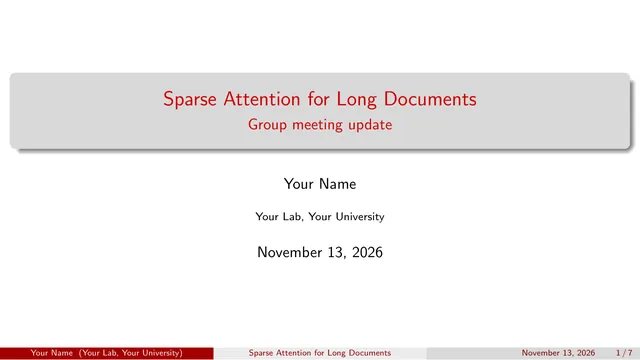
A complete 16:9 Beamer deck for a talk, group meeting, or lecture: title slide, automatic outline, bullet overlays that reveal step by step, theorem-style blocks, a two-column slide, display math, and a booktabs results table. It uses the built-in Madrid theme, so there is nothing extra to install.
Open in TeXpad, no signup → Download example PDF
Free · real pdfTeX in your browser · works offline · your files stay on your device
Who it's for
For presenting: slides you project or share as a PDF. For handouts or notes people read on their own, use the lecture notes template. For the paper behind the talk, use the research paper or conference paper template.
How to customize this template
- Change the title, subtitle,
Your Name, and institute at the top. They fill the title slide and the footer of every slide. - Each slide is one
\begin{frame}{Title} … \end{frame}block. Copy a frame to add a slide. - Reveal bullets one at a time with
\item<2->or\pause. Each step becomes its own PDF page, which is how Beamer animates. - Swap the look with one line: try
\usetheme{Boadilla},CambridgeUS, orWarsaw, and\usecolortheme{dolphin}. For 4:3 slides, removeaspectratio=169. - Beamer slides only make sense as a PDF, so the preview pane shows the compiled deck. Use Download PDF to present it full screen.
When it looks right, press Download PDF. To take the .tex to Overleaf or a local TeX install, choose Export → LaTeX source.
The first lines of the source
\documentclass[11pt,aspectratio=169]{beamer}
\usetheme{Madrid}
\usecolortheme{beaver}
\setbeamertemplate{navigation symbols}{}
\usepackage{amsmath}
\usepackage{booktabs}

\title{Sparse Attention for Long Documents}
\subtitle{Group meeting update}
\author{Your Name}
\institute{Your Lab, Your University}
\date{\today}

\begin{document}

\begin{frame}
  \titlepage
\end{frame}
…Related templates
Free LaTeX tools
- Online LaTeX compiler: paste a .tex file and get the PDF
- Import an Overleaf project: open a project zip, nothing uploaded
- LaTeX symbols cheat sheet: every common command, with a printable PDF
- LaTeX to PDF converter: drop a .tex, download a PDF