Resumes & CVs
Modern LaTeX resume with a summary up top
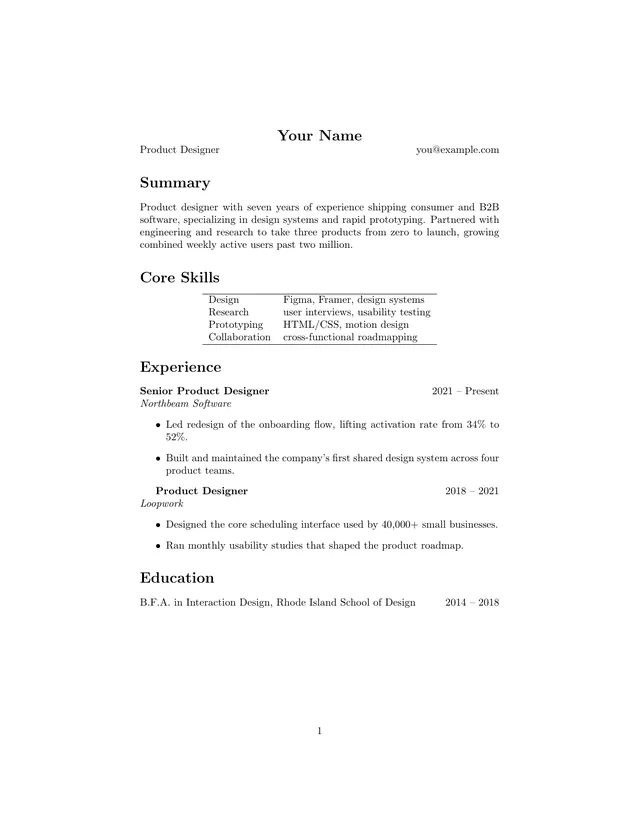
Leads with a short professional summary and your title next to your name, then experience, education, and skills. It suits people whose story matters as much as their bullet points.
Open in TeXpad, no signup → Download example PDF
Free · real pdfTeX in your browser · works offline · your files stay on your device
Who it's for
Pick this over the classic resume when you're changing careers, applying for design or product roles, or need a recruiter to get your pitch in five seconds. For a dense one-page technical resume, use the ATS-friendly LaTeX resume instead.
How to customize this template
- Write the summary as two sentences: what you do, and the result you're known for.
- Change the title next to your name for each application, for example "Product Designer" or "Design Lead".
- List 3–4 bullets per role, newest first. Cut anything older than ten years.
- Link a portfolio with
\href{https://…}{yoursite.com}. TeXpad loadshyperreffor you.
When it looks right, press Download PDF. To take the .tex to Overleaf or a local TeX install, choose Export → LaTeX source.
The first lines of the source
\documentclass{article}

\usepackage[hidelinks]{hyperref}

\begin{document}

\begin{center}
{\Large \textbf{Your Name}} \\
Product Designer \hfill \href{mailto:you@example.com}{you@example.com}
\end{center}

\section*{Summary}
Product designer with seven years of experience shipping consumer and B2B software, specializing in design systems and rapid prototyping. Partnered with engineering and research to take three products from zero to launch, growing combined weekly active users past two million.

\section*{Core Skills}
\begin{center}
\begin{tabular}{ll}
\hline
…Related templates
Free LaTeX tools
- Online LaTeX compiler: paste a .tex file and get the PDF
- Import an Overleaf project: open a project zip, nothing uploaded
- LaTeX symbols cheat sheet: every common command, with a printable PDF
- LaTeX to PDF converter: drop a .tex, download a PDF